Shift is a built-in command in bash which after getting executed, shifts/move the command line arguments to one position left. The first argument is lost after using shift command. This command takes only one integer as an argument. This command is useful when you want to get rid of the command line arguments which are not needed after parsing them.
Syntax:
shift n
Here, n is the number of positions by which you want to shift command-line arguments to the left if you do not specify, the default value of n is assumed to be 1 i.e shift works the same as shift 1.
Example: Let’s create a shell script file named as sampleshift.sh as follows. The total number of command-line arguments is represented by $#. Use the following command to create the desired shell script file
vi sampleshift.sh
Now paste the following code:
#!/bin/bash

# total number of command-line arguments
echo "Total arguments passed are: $#"

# $* is used to show the command line arguments
echo "The arguments are: $*"

echo "The First Argument is: $1"
shift 2

echo "The First Argument After Shift 2 is: $1"
shift

echo "The First Argument After Shift is: $1"
Now to save the file press ESC and then type “:x” without quotes and hit Enter. Now to execute the file, use the following command on Linux terminal
sh sampleshift.sh
But here we have to pass command-line arguments so we can use the following command
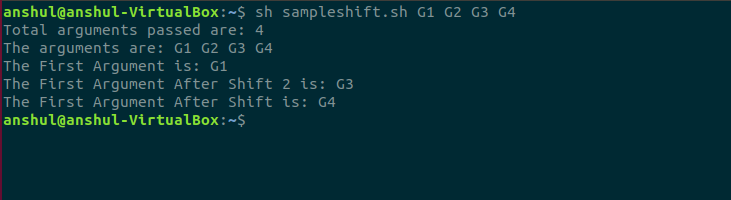
sh sampleshift.sh G1 G2 G3 G4
Here, we are passing 4 command-line arguments named G1, G2, G3, and G4. Below is the screenshot of the output of using shift command:
Functions in Shell Scripts
#!/bin/sh
# A simple script with a function...

add_a_user()
{
  USER=$1
  PASSWORD=$2
  shift; shift;
  # Having shifted twice, the rest is now comments ...
  COMMENTS=$@
  echo "Adding user $USER ..."
  echo useradd -c "$COMMENTS" $USER
  echo passwd $USER $PASSWORD
  echo "Added user $USER ($COMMENTS) with pass $PASSWORD"
}

###
# Main body of script starts here
###
echo "Start of script..."
add_a_user bob letmein Bob Holness the presenter
add_a_user fred badpassword Fred Durst the singer
add_a_user bilko worsepassword Sgt. Bilko the role model
echo "End of script..."
Below is the output after execution of above script (test1.sh)

